Showing posts with label Web Surfing. Show all posts

Monday, November 15, 2010

Testing a Blog Board

I skim lots of blogs. As such, I've already forgotten (just since yesterday) where I heard the term "Blog Board" and found the link to MCP Actions. I just tried out their free "Try-Me" blog board though, and I must say, it's very cool!

During our last Arizona trip, the boys were helping their Great Aunt clean up some fall debris from around her house.

This "blog board" action was super easy to use! Now, I'd like to figure out how to create my own templates for this type of thing. So, if any Photoshop savvy readers are out there and can tell me how to do this type of thing, I'd sure appreciate it! I already know a bit about working in Photoshop and creating Actions, I'm just not sure how to create the steps where photos are loaded (and resized) into the proper layer positions.

Oh yeah, I also used the "Soft & Faded" action from The Pioneer Woman's Free Action Set #1.

Wednesday, October 21, 2009

Making a Mermaid Tail

I just saw this wonderful little tutorial on making a mermaid tail and had to share.

Photo from Elegant Bloggery

It's times like these that I wish we had a daughter!

-------------------------------------

5:53pm - HEY!!! I *JUST* realized I cou
ld make the boys MerMAN fins!


Give them a pitch fork and crown so they could be "King Triton".


In the background, I hear Tom saying "it was at that point, Your Honor, I was forced to kill her..."

Friday, June 05, 2009

The Hero Factory - Incredible or Fancy?

I just took a break between reading my College Text Book and taking my first online quiz. I was catching up on Celise's Blog and saw this "Coolio" link to create a Super Hero. Here I am:


Which character do you prefer?

Okay. Enough playing all ready! Back to the books / tests / net for this online Political Science Class I'm taking. Just like Celise predicted, you can spend WAY too much time goofin'!

Sunday, May 03, 2009

Technology Essay

I just entered a contest from HP for a $5,000 Electronic Make Over. You have to write a 200 word (or less) essay about how you use electronic to help in your busy life. I'm not sure my entry was quite what they had in mind. That is, I imagine they want something about how wonderful and grand the electronics are, and my essay, well, just read it for yourself...
I think the most important way I use technology is to control how much of it we have. I am constantly analyzing if an item is really “helping” us, or if it is just taking up time and space. As such, we live without “necessities” like a TV, Microwave, Dishwasher, Stereo, and Coffee Pot. When I bring something into my home, I want to make sure it helps us to stay focused on the things that matter… which aren’t things at all, but people. The other way I use technology, is limit the amount of time we spend in front of electronic items. There is so much to see and do in this world; I encourage my family to get out there and experience the real world, instead of the one on-screen. Some days I classify as a “Power Down” day, where all electronics (including computers and phones) get turned off, and we spend the day cuddling and relaxing and playing. I really think it’s important to remember the technology is here to serve us; we have to keep that in mind so we don’t let ourselves get overrun with the latest gadget or gizmo.

Monday, April 27, 2009

Hulu - Legend of the Seeker - Terry Goodkind

I think I'm the last one in the world to find out about HULU. Everyone I mention it to, seems already to know about this internet resource for watching free movies and TV. I have an Amazon subscription to Season 8 of Smallville. From what I've seen, Hulu videos are of a better quality than the ones that I PAY FOR on Amazon!

The TV series that was pointed out to me, is in the Family Section, and is called Legend of the Seeker. The first few videos, Tom and I thought the acting was poor, but around the 4th episode, the actors seem to be "clicking" with each other and their characters. Now, we quite enjoy them. So much so, that I looked up the books (The Sword of Truth) that the TV series is based on... by Terry Goodkind. Currently, there are ELEVEN books in his series, plus a Prequel.

Since I'm sick, and my library has all of them, I'm devouring the books. In #1, Wizard's First Rule, there is one section in particular (Chapter 24) that is gory and gruesome and just nasty disgusting. I think I could have skipped those six pages and just been told that The Bad Guy is REALLY EVIL and I would have been happier. Still, I'm enjoying the books (on #2, Stone of Tears now), and if you pick up the first book, just skip chapter 24 to avoid being grossed out.

As far as the series versus the books. The main characters are fairly accurate. There are some scripts that seem to have been taken straight from the pages of the book. Most of the show though, uses the general ideas and traits from the book, and then mixes them up for story lines.

Even though the show isn't dead-on, it's close enough, and (since I watched it first) I enjoy reading the books and finding out the "real story" behind things.

Now, I need someone else to read these books, so I can compare notes with you and see what you think is going on in them!

Are there any other really cool websites I've been missing?

Postscript added 8 May 2009: I've had SO MANY people calling me about this series, I've currently got at least three people started reading with me, and at least three more ready to check the books out of their libraries.

I wanted to add a disclaimer / warning / rating. Now I'm on book four, and I know that this stuff is definitely "R" rated, for mature audiences, not anything I'd let me teens read. Not that many teens would willingly dive into a series of books nearly 9,000 pages and twelve books long, but I just wanted to throw that warning out there for those of you with kids that might be interested in Fantasy... I'd keep this away from them for a few more years. :)

Wednesday, April 15, 2009

Boredom Haiku

Coughing and Hacking,
Killing Time on Computer,
Hacking and Coughing.

After several days of restraint, I'm bored. I'm surfing more, but not really accomplishing much.


I could be blogging more.
I could be editing pictures.
I could be knitting more.
I could be reading.

I still can't talk much.
My sinuses are blocked.
My cough is ever present.

I'm lethargic.
I'm bored.

Friday, March 20, 2009

Google Doodle Holiday Logos

I really do enjoy the different variations of Google Doodles... and how they pay tribute to so many random things. I always click the link and learn a little about something new through them.

I was glad to find a link to the History of Google Holiday Logos and wanted to share it with you as a follow-up to my previous post on this topic.

Friday, January 23, 2009

Knitting Links

Here are some Knitting Links and other pointers I've found to be invaluable:
KnittingHelp.com - My friends tried to teach me to hold the yarn with my right hand and I do better with the left... I figured that out with videos on this site.

Ravelry.com - You need to request membership. It's a WAY cool way to organize your supplies, ideas, and projects and also a great place to surf for ideas. I really like how you can see one project made by so many other people, along with their comments. Anyway, check it out. When you can look, I'm at SiouxzQzz.

Start with a natural fiber (cotton or wool) yarn and bamboo needles. Also, light or medium colored yarns will be easier to see your stitches on than dark colors. Seeing your stitches is helpful when you're learning what to do.

Lovely sets of bamboo needles can be acquired from SusanCraft6798 of SusanCraftDesign on ebay.

Lion Brand Yarn - Nice selection of free patterns, plus e-newsletters, and supplies.

Mary Maxim - good prices on yarn and supplies for all sorts of hand crafts (knitting, crochet, embroidery, etc.)

Manly Scarf Pattern - Free Online - GREAT for beginners, just uses three stitches (slip, knit, and purl). Just using this "basket-weave" idea, you can make each section as wide and tall as you like. Mine are all three stitches wide, but each section is a random number of rows.

Multidirectional Scarf Pattern - Another good beginner project, it had three stitches (increase, knit, and decrease) plus casting on. I think this looks better in a variegated / striped yarn than a solid.

Silver's Sock Class to help "see" how to make socks. This isn't a pattern, so much as detailed instructions for each step of making a pair of socks.

A good beinner sock yarn and pattern are Moda Dea Sassy Stripes Yarn, and the Knitted Socks pattern LM0131 by Grace Alexander.

I'm told that learning to crochet first is easier for most people; knitting first and then crocheting tends to be more difficult. So, if you already can crochet, you're half-way there! If you're new to yarn crafts, try picking up a crochet hook first, and then moving up to knitting.
I've found that being able to click or look at video or pictures over and over is really helping me along with knitting. I've also discovered that the natural fibers (wool/cotton) and needles (bamboo) are really big helps for beginning knitters! I hope these links help you as much as they've helped me!

Wednesday, January 21, 2009

Theme - Things That Fly Songs

Here's the list (in the order we thought of them) that Tom and I (and Celise and Lisa and Heather) came up with...
  1. Guitarzan by Ray Stevens
  2. The Fly by Chubby Checker
    Singer of "The Twist" :D
  3. Last Dollar (Fly Away) by Tim McGraw
    Kids really seem to love singing this song... probably because of the "1, 2, 3..." at the beginning.

  4. Dance of the Sugar Plum Fairy from The Nutcracker by Tchaikovsky
    I know this piece is overdone in Ice Skating, but it IS about a Fairy, so, I include it.
    PS – Take a look at this link… it's pretty cool, the musician is playing on a
    glass armonica, invented by Benjamin Franklin; only a dozen musicians in the world today.
  5. Fly to Your Heart by Selena Gomez
    Theme Song from "Tinkerbell" Movie
  6. Bring Me To Life (Wake Me Up Inside) by Evanescence
    Nice song for a solo... starts out slow then turns edgy. Not really anything "flying" specific, that would have to come through costumes/props.
  7. Flying Nun Theme Song by
  8. Fly Away with Me by Sterbinszky
    Techno
  9. Fly Away Home by Mary Chapin Carpenter
  10. Star Trekkin by The Firm
  11. Time for Me to Fly by REO Speedwagon
  12. Indiana Jones Theme Song
    Just because I love it… not sure what to "fit" it with though.
  13. I Believe I Can Fly by R. Kelly
  14. Let's Go Fly A Kite (Mary Poppins)
  15. Leaving on a Jet Plane - John Denver or Peter, Paul & Mary (both are good)
  16. Rocket - Def Leppard
  17. Flight of the Bumblebee - Nikolai Rimsky- Korsakov
  18. Learning to Fly - Tom Petty
  19. Fly me to the Moon - any version
  20. Flight of the Icarus - Iron Maiden
  21. Fly Like an Eagle - Steve Miller
  22. Aeroplane - Red Hot Chilli Peppers
  23. Learn to Fly - Foo Fighters
  24. You Can Fly - Peter Pan!
  25. Come Fly with Me - Frank Sinatra or Michael Bublé
  26. Breakaway - Kelly Clarkson
  27. Find Your Wings - Mark Harris
Whoo-hoo I KNOW there are several winners in this batch! Now. It looks like you have to start making choices. :D

I like the fact that there are all different types of music, but most are upbeat (no drearie's here).

Tuesday, January 20, 2009

Taking Closeup Shots

I notice that people tend to have a lot of trouble taking close-up photographs of items, especially things for sale, or example online. I just left some comments about how I make it work, and while I'd *like* to include photos, I probably won't get around to that any time soon, so, here are some pointers (text only).

Often pictures are washed out (from the flash), dark (no flash), and or fuzzy. Here are some things I do to eliminate these problems:
  • Wait for the sun to shine through a window, then place the item in the sunlight and get to the side of it for some pictures. (If the sun's at 12:00, and the item is at 6:00, you and the camera should be around 2:00 or 10:00).
  • Pay attention to where your shadow is relative to your item (I usually try to keep my shadow off the item).
  • Then, place the item just into the shade, right by the ray of sunlight and take some more pictures.
  • Using natural light, you shouldn't need a flash. This will help with color, though it can also seem to make auto-focus camera images "fuzzy", so, try using different pre-set settings to take pictures of the same item. (Go crazy here! So what if you're taking a picture of something you've hand-crafted, maybe the best pre-set setting is one for "food" or "text" or "animals", try a whole spectrum to see just what your camera can do for you!)
  • Also, get the camera a little closer and a little further away. You can try zooming in and out (though for this kind of close-up work, I usually prefer not to zoom).
  • Take note of which settings you're using, and then, go look at them on the computer.
  • This first set of pictures, you might take 20 different shots.
  • You should find at least one or two settings that "work" for you, your camera, and your lighting!
  • You may want to (even plan to) crop your pictures, especially if getting too close makes things fuzzy or washed out, you can crop after and still get a nice shot!
I hope this helps; let me know if you try these experiments and how they go!

Wednesday, December 17, 2008

How to insert HTML Code into your Blogger Layout.

After several attempts, I finally figured out how to insert some tracking codes into my Blog. I've really been enjoying seeing how many visitor stop by, and where they are located. In response to requests on how to do this, here's a step-by-step on how to add an HTML Gadget to your Blogger Page.
1. Create an account with the service you wish to use (my global tracker is www.feedjit.com and my counter is www.amazingcounter.com). You could also use a search engine for "free online counters" or some such search. There are MANY options out there!
2. Set up the service options you want (format, colors, etc.)
3. Copy the HTML code from the service.
4. Log into your Blogger Dashboard (type www.blogger.com, then enter your user name and password).
5. Click “Layout” under the Blog you wish to modify.
6. Click “Add a Gadget” on the area of the page you want to have the item located (side bar / bottom / etc.)
7. Scroll down the list to “HTML/JavaScript” and click the PLUS SIGN (+) beside it.
8. If you want, give your gadget a TITLE.
9. Paste the HTML code from the service in the CONTENT field.
10. If you would like, you may drag and drop the new gadget to a different place in the layout of your page.
11. Click “PREVIEW” near the top of the page.
12. If you like what you see, then click “SAVE”.
13. Go check out the new functionality on your page! :D
Let me know if you add something to your page!

Friday, December 05, 2008

Pencil Sculptures

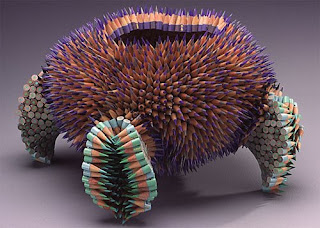
While making on a few new Job Chore Cards for my boys, I was looking for free Clip Art for a "Sharpen Pencils" card. Take a look at some of the intriguing pencil sculptures I found:


72 Pencils is a geometric construction of 72 pencils, assembled into a work of art. Restricted to a signed limited edition of twenty-five, each shares a common form, yet each is unique. The form is an arrangement of four intersecting hexagonal tubes that penetrate each other in a fascinating three-dimensional lattice.

Colorful Pencil Sculptures by Jennifer Maestre

In order to create the pencil sculptures, hundreds of pencils are cut into 1-inch sections. Then they are drilled with a hole in each section so that they resemble beads. Next they are sharpened and sew together using the peyote stitch technique.
Here's an article about Jennifer Maestre's work.

So. What common, household or office object are YOU going to do something CREATIVE and OFF-THE-WALL with? :D

Saturday, October 11, 2008

A little something fun.

I found this little video "EepyBird's Sticky Note Experiment" on Thoughtstream's Blog.

It made me smile.


I thought I'd share!
:D

Monday, July 07, 2008

Quilt in the Works - Happy Hour

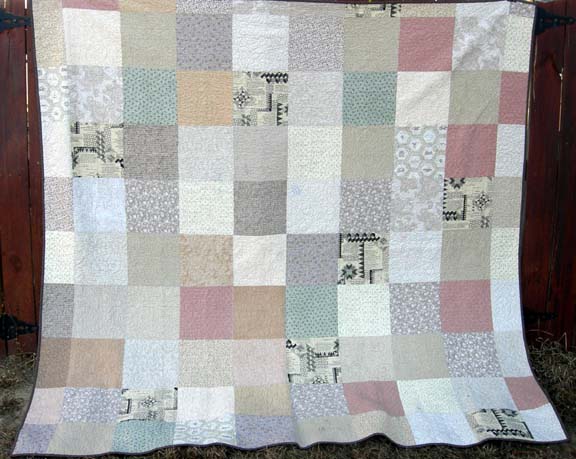
Amanda Jean, of Crazy Mom Quilts, recently made this quilt for herself...


The pattern is Happy Hour from Atkinson Designs.

I'm planning to make my own version from these fabrics:


Which I picked out yesterday.

Since I don't have the Atkinson Designs book, but the design is
so simple I just calculated yardage yesterday on my own. I can get two 9" blocks out of each 5 1/4" WOF strip I cut. So, with this assortment of 42 fabrics, I'll have 84 blocks. Enough for a twin size quilt.

Now. I'm on the hunt (in my sewing room, the local clearance racks, and online at Marshall Dry Goods and eQuilter for some backing.) I'd like to use my own fabrics to do Bonnie Hunter's (of Quiltville Fame) method of 10 1/2" blocks for the back, BUT since many of my fabrics are still packed (I actually had to open my purple and green boxes to find the fabrics for this inspired piece), I think finding some fabric cheap will be my better (quicker) option.

I'd like to have this quilt top done by Wednesday and quilted Thursday or Friday... will have to see when I can get an appointment on the local long-arm machine.

Can I do it?

Make a quilt (and paint a bathroom (also on my list for this week)) by the end of this week?

Tuesday, June 17, 2008

1930's Homemaker

I always knew I should be "Suzy Homemaker"... actually, after divorcing my first husband, I seriously contemplated making "Homemaker" my legal last name. I KNEW I'd get married again, and so wouldn't carry the name for long, but I also thought it would be A TON OF FUN to REALLY and truly be Suzy Homemaker! Any-who, I just took the 1930's Wife Test and came up very well...

64

As a 1930s wife, I am
Superior

Take the test!

How did you do?

Monday, June 09, 2008

My Three Favorite Games / Past Times from Childhood

I just linked around to a post from Metropolitan Mama to remember "My three favorite games/past times from childhood". Just thinking of it is tough, not much coming to mind, oh, wait...
  1. Crayons / Coloring
  2. Bubbles
  3. Rainbows
I think it would revolve around these three colorful things. It may not seem imaginative, but, if you could see the assortment of colors I just painted my new house, or the piles and piles of fabric (which I consider my sewing "palette"), you would know that bright, beautiful colors still play a big part in my life!

Sunday, May 18, 2008

Height Predicting Fun

I know that there's no exact science to figuring out how tall a person will be. I also know that there are laws of averages and mathematical equations can show you a lot.

Parent Center has a tool you can use starting when your children are two and going until they are twelve. I've always had fun typing in my kids info. Basically, you take their height and weight at certain milestones (every six months between two and twelve), plus Mom and Dad's mature heights and the child's gender. You type all that in to the calculator and then see how tall your child will likely be. It's also interesting (to me) to see how the predictions change with time. I have a spreadsheet for all of my kids medical visits (what for, why, who they saw, height, weight, etc). I just added a sheet for their height predictions. It's fun to see them side-by-side...

Frank Jack

Actual Weight Prediction Within
2 years 36" 37 lbs 6' 8" 4" 34 1/4"
31 lbs 5' 10"
3"
3 years 41 1/4" 42 3/16 lbs 6' 5"
2" 37 1/2"
36 lbs 5' 11"
2"
4 years 43 3/4" 44 lbs 6' 4"
2"


5 years 46 3/4" 50 lbs 6' 4"
2"


How tall are your kiddos suppose to be?

Do you have the numbers from when your children (who are now grown) were little? Type them in and tell us how close the numbers are.

Friday, May 16, 2008

Google Doodles

Another cool Google Doodle. The first LASER demonstration was 48 years ago. I once did a report (for Physics) on LASERs. Here, I'll share with you that LASER stands for:

Light Amplification by the Stimulated Emission of Radiation

Country Mouse, City Mouse Article

I think this article speaks of much since our recent move from "The Fifth Largest City in the Nation" (Phoenix) to "The Least Densely Populated State in the Nation" (Wyoming).

Sunday, March 16, 2008

Quilting Projects I’ve Seen

I recently came across two patterns online that look fun, fast, and easy. They are both online tutorials. Take a peek, maybe you'd like to make one of them (from the scrap bin?)

The Future's So Bright Quilt by AmandaJean of Crazy Mom Quilts. Here are the specific instructions for making it.

The second one is SUPER SCRAPPY and FAST... Scrap Strip Squares by HappyThings.

Please send me a picture if you make one of these cute quilts!